How to Detect Phishing Domains Targeting Your Brand — Free Tool Inside
Learn how attackers create fake domains targeting your brand and how to detect them for free using PhishPin's threat intelligence platform.
Every day, cybercriminals register hundreds of fake domains designed to impersonate legitimate brands. If your business has an online presence, there is a very good chance that someone, somewhere, has already created a domain that looks exactly like yours and is using it to steal your customers' data, money, and trust.
In this guide, we will show you exactly how phishing domains work, how attackers target your brand, and how you can detect them for free using PhishPin.
What Is a Phishing Domain?
A phishing domain is a fake website address created to impersonate a legitimate brand. When a customer visits this fake domain, they see a website that looks identical to the real one — same logo, same colors, same layout — but everything they type is being stolen.
For example, if your brand is "ExampleBank", an attacker might register:
examp1ebank.com (replacing the letter "l" with the number "1")
examplebank-login.com (adding a word to make it look official)
exampleebank.com (doubling a letter)
εxamplebank.com (replacing a Latin letter with a visually identical Greek character)
These techniques are so sophisticated that even trained professionals miss them at first glance. Your customers certainly will.
Why Your Brand Is a Target
You might think only large corporations like banks or Amazon need to worry about phishing. This is a dangerous misconception.
Attackers target brands of every size. In fact, smaller brands are often easier targets because they have fewer resources dedicated to monitoring and enforcement. The moment your brand has any recognizable presence online — customers, social media followers, or search engine rankings — you become a target.
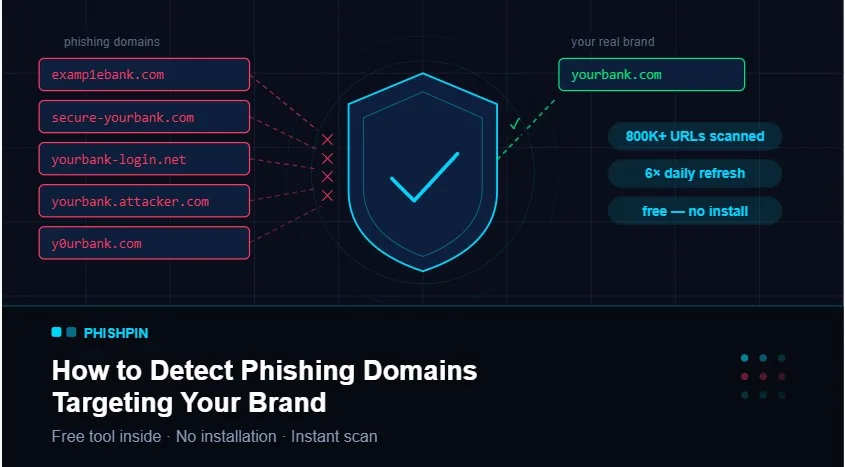
According to data from PhishPin's threat intelligence feeds, over 800,000 active phishing URLs are circulating across the web at any given time. A significant portion of these target mid-sized and small brands that have no idea they are being impersonated.
The consequences of a successful phishing attack on your brand include:
Customers losing money and blaming your company
Irreversible damage to your brand reputation
Legal liability in some jurisdictions
Loss of customer trust that takes years to rebuild
How Attackers Create Fake Domains Targeting Your Brand
Understanding the techniques attackers use is the first step toward defending against them. Here are the most common methods:
1. Typosquatting
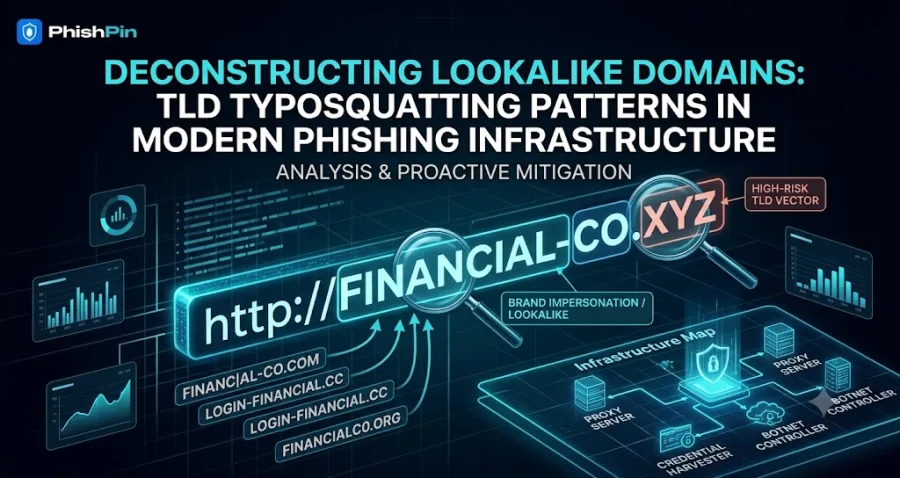
The attacker registers a domain with a small spelling mistake, betting that users will mistype your brand name. For example, gooogle.com instead of google.com.
2. Homoglyph Substitution
Characters that look visually identical are swapped in. The letter "o" becomes the number "0", the letter "l" becomes the number "1", or Latin characters are replaced with visually identical Cyrillic or Greek characters. These are almost impossible to spot with the naked eye.
3. Subdomain Abuse
The attacker uses your brand name as a subdomain of their own domain. For example, yourbank.attacker.com. Users see "yourbank" in the URL and assume it is legitimate.
4. Prefix and Suffix Manipulation
Words like "login", "secure", "official", "verify", or "support" are added before or after your brand name. For example, secure-yourbank.com or yourbank-login.com.
5. Leet-Speak Encoding
Letters are replaced with numbers or symbols that resemble them visually. The letter "a" becomes "4", "e" becomes "3", "o" becomes "0". This makes the domain look slightly different while remaining recognizable.
How to Detect Phishing Domains Targeting Your Brand
Manually searching for fake domains is time-consuming, unreliable, and nearly impossible to do at scale. This is where dedicated threat intelligence tools become essential.
Here is a step-by-step process to detect phishing domains targeting your brand:
Step 1: Identify Your Brand Keywords
List every variation of your brand name that attackers might use. Include your company name, product names, and any commonly used abbreviations. Even short brand names can have dozens of potential typosquat variations.
Step 2: Monitor Active Phishing Feeds
The most dangerous phishing domains are those that are currently active. Monitoring public phishing intelligence and community threat repositories gives you visibility into live threats.
Step 3: Check Newly Registered Domains (NRD)
Attackers often register domains days or weeks before launching a campaign. Monitoring newly registered domains for your brand keywords gives you early warning before an attack begins.
Step 4: Verify Domain Status
Not every flagged domain is actively serving phishing content. Checking whether a suspicious domain is live, resolving, or down helps you prioritize your response.
Step 5: Take Action
Once you identify a phishing domain, you can submit takedown requests to the domain registrar, hosting provider, or national CERT. For trademark abuse, UDRP filings are also an option.
Detect Phishing Domains Targeting Your Brand — Free
PhishPin is a free brand threat intelligence platform that automates this entire process. It scans over 800,000 phishing URLs from multiple trusted sources and checks every one for signs of your brand being targeted.
Here is what PhishPin detects:
Typosquatting — character swaps, deletions, and insertions
Homoglyph substitution — visually identical character replacements
Subdomain abuse — your brand used as a subdomain
Prefix and suffix patterns — login, secure, verify, and more
Leet-speak encoding — number and symbol substitutions
Active domain status — live vs. down verification
No installation required. No account needed to get started. Simply visit PhishPin.com, enter your brand name, and run a scan in seconds.
What to Do When You Find a Phishing Domain
Finding a phishing domain targeting your brand is alarming, but there are clear steps you can take:
1. Document Everything
Screenshot the phishing site, record the domain name, registration date, and hosting provider. This evidence will be needed for any formal complaint.
2. Contact the Hosting Provider
Most hosting providers have an abuse reporting process. Submit a detailed report with your evidence. Legitimate providers will investigate and usually take down confirmed phishing sites within 24–72 hours.
3. Report to the Domain Registrar
Find the registrar using a WHOIS lookup and submit an abuse report. If the domain is clearly infringing on your trademark, you can also pursue a UDRP complaint.
4. Report to Google Safe Browsing
Submitting the phishing URL to Google Safe Browsing gets it flagged in Chrome and other browsers, protecting your customers immediately.
5. Notify Your Customers
If you believe customers may have already visited the phishing site, send a warning through your official channels immediately.
How Often Should You Scan for Phishing Domains?
Phishing campaigns can launch overnight. A domain registered today could be sending fake emails to your customers by tomorrow. For this reason, regular scanning is essential.
For most brands, scanning at least once per week is a reasonable baseline. Brands in high-risk industries — banking, e-commerce, healthcare, cryptocurrency — should consider daily monitoring.
PhishPin's threat intelligence feeds are refreshed six times per day, ensuring you always have access to the latest threat data.
Final Thoughts
Phishing domains are one of the most underestimated threats facing brands today. The damage they cause — to customers, to reputation, and to revenue — is real and growing every year.
The good news is that detection does not have to be expensive or complicated. With the right tools and a consistent monitoring routine, any brand can stay ahead of attackers.
Start protecting your brand today with a free scan at PhishPin.com.
PhishPin is a free brand threat intelligence platform providing real-time phishing detection, URL analysis, and cybersecurity threat intelligence for organizations worldwide.
Is your brand being impersonated?
PhishPin finds lookalike domains, fake profiles and phishing kits that copy your brand - and gets them taken down. Get a confidential 24-hour audit.
Get my free audit