How to Detect Phishing Domains Targeting Your Brand
Every day, attackers register domains that imitate well-known brands. They copy a login page, send a link by e-mail, text message or social media, and collect whatever victims type. If customers know your name, someone has probably already thought about faking it.
This guide explains how fake domains imitate a brand, how to detect them with a repeatable routine, which free tools help, and what to do when you find one.
What is a phishing domain?
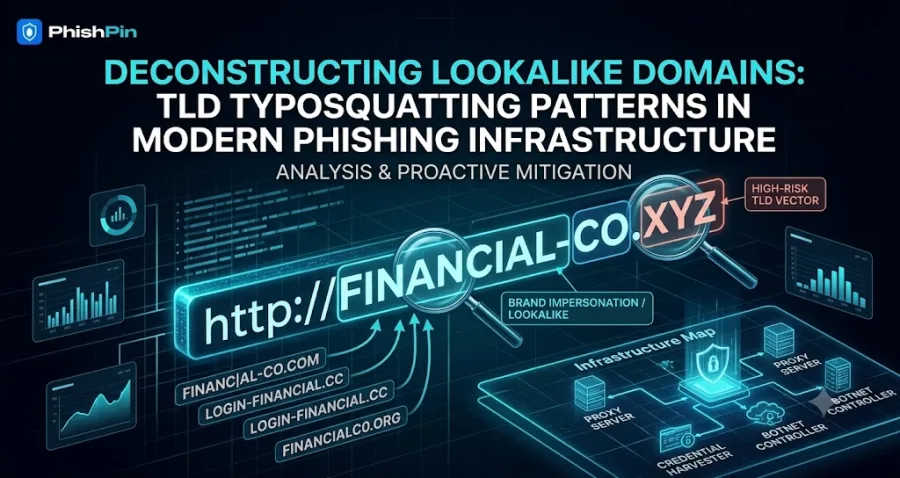
A phishing domain is a web address built to look like a legitimate brand so that people trust it. The page behind it usually copies the real site's logo, colours and layout, and everything a visitor enters is sent to the attacker. For a brand called "ExampleBank", an attacker might register:
- examp1ebank.com: the letter "l" replaced by the number "1"
- examplebank-login.com: a trust word added to look official
- exampleebank.com: a doubled letter that is easy to miss
- login.examplebank.attacker-site.com: your name placed in a subdomain of a domain the attacker owns
The five patterns attackers use
- Typosquatting. A small spelling mistake that catches people who mistype or skim, such as gooogle.com for google.com.
- Look-alike characters (homoglyphs). Characters that resemble each other are swapped: "rn" for "m", "0" for "o", or a Cyrillic or Greek letter that looks identical to a Latin one.
- Brand plus a trust word. Words such as login, secure, verify, support or account are added before or after your name, for example secure-yourbrand.com.
- Subdomain abuse. Your name appears at the start of the address, but the real domain is the part just before the first slash. People read "yourbrand" and stop.
- Different ending (TLD swap). The same name on another ending, such as yourbrand.co, yourbrand.app or yourbrand.xyz.
How to detect phishing domains targeting your brand
You cannot find these by searching manually, because attackers register new ones faster than you can look. A simple routine works better:
- List your brand terms. Write down your company name, product names, common abbreviations and misspellings, plus every domain you really own. This list drives every other step.
- Generate the likely look-alikes. Free open-source tools such as dnstwist create thousands of typo and look-alike variations of a domain and show which ones are already registered. Run it against your main domains and keep the results.
- Watch newly registered domains. Attackers often register a domain days or weeks before using it. Checking each day's list of newly registered domains for your brand terms gives you early warning, before the first victim.
- Watch certificate logs. Most phishing sites now use HTTPS, and every public certificate is recorded in certificate transparency logs. Search tools such as crt.sh let you look for certificates issued for names containing your brand. A new certificate for "yourbrand-login" is a strong signal.
- Read your DMARC reports. If you publish a DMARC record with a reporting address, mailbox providers send you reports showing who is sending e-mail as your domain. Moving to an enforced policy (quarantine or reject) stops direct spoofing of your own domain, although it cannot stop look-alike domains.
- Check what is actually live. Not every registered look-alike is used for fraud. Many are parked, resold or harmless. Check whether a domain resolves and what it serves, but never open a suspicious address on a normal work computer. Use an isolated analysis environment, or let a trained security analyst do it.
- Listen to customers and staff. Give customers an easy way to forward suspicious messages, and watch your support inbox. Customers often notice a fake before any tool does.
Free tools or managed monitoring?
Free tools are a good start, and every brand should run them at least once. Their limits are that they are manual, they run only when someone remembers to run them, they produce long lists without telling you which ones matter, and they do not remove anything.
Managed monitoring watches continuously, filters out harmless domains, collects evidence and files the removal requests with hosting providers, registrars and platforms. PhishPin's phishing and look-alike domain service does this end to end. To see what attackers are already doing with a well-known name, browse our live phishing data for more than 500 brands, updated daily.
What to do when you find a phishing domain
- Document it. Capture screenshots of the page, the full address, the registration date and the hosting provider. You will need this for every complaint.
- Report it to the host. Send an abuse report with your evidence to the hosting provider. Response times vary from hours to days, and some providers do not respond at all.
- Report it to the registrar. A WHOIS or RDAP lookup shows the registrar and its abuse contact.
- Report it to browser protection. Submit the address to Google Safe Browsing so Chrome and other browsers warn visitors.
- Consider a legal route. When the domain infringes your trademark, a UDRP complaint, or a URS case for many newer endings, can transfer or suspend it.
- Warn your customers. If people may have visited, tell them through your official channels what the fake looks like and what to do.
How often should you check?
Campaigns can start the day a domain is registered, so we recommend checking at least weekly and daily for high-risk sectors such as banking, e-commerce, healthcare and crypto. Automated monitoring removes the need to remember.
Where to start
Run the free checks above this week. If you would rather have them done for you, request a free 24-hour audit and we will show you which look-alike domains and fake pages exist for your brand today.
Frequently asked questions
How do I know if someone is impersonating my brand?
Search newly registered domains and certificate logs for your brand terms, check your DMARC reports, and ask customers to forward suspicious messages. A domain containing your name is a warning sign, not proof of fraud, until you have checked what it serves.
Are free tools enough to protect my brand?
They are enough to find out whether you have a problem. They are rarely enough to manage one, because they do not monitor continuously or handle removals.
Can I take down a phishing domain myself?
Yes. Report the page to its host and registrar and to Google Safe Browsing. It takes time, and results depend on how quickly each provider responds.
Does a look-alike domain always mean fraud?
No. Some are parked, resold or registered by fans or competitors. That is why checking what a domain actually serves matters before you act.
Is your brand being impersonated?
PhishPin finds lookalike domains, fake profiles and phishing kits that copy your brand - and gets them taken down. Get a confidential 24-hour audit.
Get my free audit